Maia is MyCo's built-in AI Business Assistant. She is designed to help you run your organisation more effectively by surfacing insights, answering questions and, over time, suggesting actions based on what is happening in your account. This guide explains who Maia is, what she can currently do, and what is coming next.
1. Who is Maia?
Maia is MyCo's AI-powered business assistant. She appears across the platform to help you get more value from your data and your tools. Whether she is surfacing a weekly business insight on your dashboard, sending an executive briefing to your leadership team, or answering a question via live chat, Maia is the same trusted voice throughout your MyCo experience.
Maia is not a generic chatbot. She is context-aware, meaning she understands the type of organisation you run and tailors her language and analysis accordingly. A church will receive very different insights from an alumni association or a small business, because Maia understands that the metrics that matter are different for each.
2. What can Maia currently do?
Maia currently has two active capabilities on MyCo:
Business Insights — Maia analyses your live account data each week and generates a short set of specific, actionable insights. These appear on your dashboard and can also be delivered by email to your leadership team or board. She looks at revenue, engagement, contacts, outstanding invoices, product performance and more, depending on your organisation type.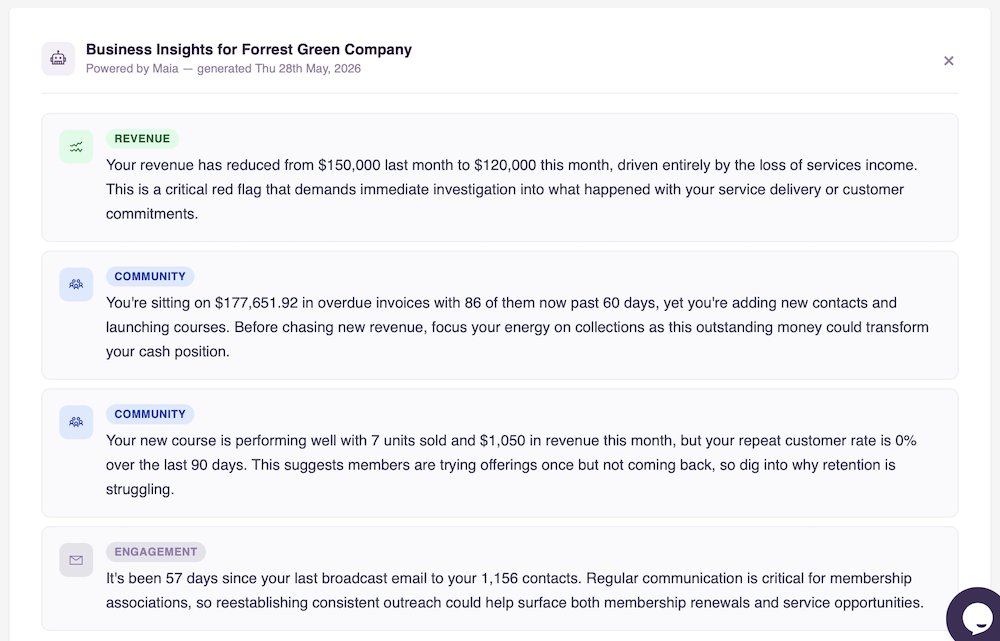
Live Chat Assistance — Maia is available via the MyCo chat interface to answer questions about the platform, help you find features and guide you through tasks.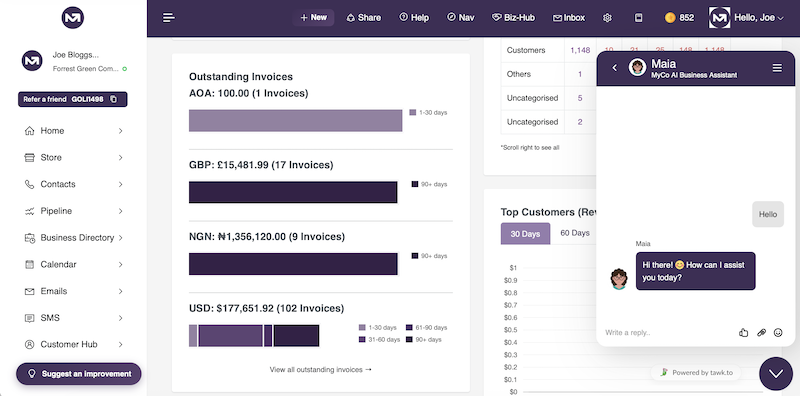
Additional capabilities are in development and will be introduced over time.
3. What are Maia's Business Insights?
Once a week, Maia analyses your account data and generates 3 to 5 personalised insights about your organisation. These are not generic tips. They are based on your actual figures, such as how your revenue has moved this month compared to last, whether your contact base is growing, how long it has been since your last broadcast communication, and whether any invoices are significantly overdue.
Each insight leads with the actual current figure, then explains the movement and what it means. Maia always shows both the absolute change and the percentage change so you have the full picture at a glance.
4. How does Maia generate insights?
Maia gathers a set of data points from your MyCo account, including revenue figures, contact activity, invoice status, email engagement and product performance. This data is then sent to an AI model, which interprets it and generates written insights in plain English. The insights are stored in your account and refreshed every seven days.
No personal contact data (such as names, email addresses or phone numbers) is included in what is sent to the AI. Only aggregated figures and counts are used.
5. How often are insights updated?
Maia refreshes your insights once every seven days. When new insights are generated, the panel on your dashboard will reappear automatically, even if you had previously dismissed it. The date the insights were generated is always shown so you know how current they are.
6. Why do my insights look different from another organisation's?
Maia tailors her analysis to the type of organisation you run. The three current profiles are:
Alumni and Membership Associations — Maia analyses dues, donations and sales as separate revenue channels, because these tell very different stories about member engagement and organisational health.
Churches and Ministries — Maia focuses on giving, community growth, broadcast communications, upcoming birthdays, active courses and mentoring relationships. She uses warm, encouraging language and frames everything around community and ministry health rather than commercial performance.
Small and Medium Businesses — Maia focuses on overall revenue movement, outstanding invoices, customer retention, contact growth and product performance.
7. What data does Maia analyse?
The data Maia looks at depends on your organisation type, but generally includes:
Revenue figures for the current and previous month, broken down by channel where relevant. Outstanding and overdue invoices. New contacts added this month and total address book size. Days since your last broadcast email or communication. Subscriptions expiring in the next 30 days. Low stock products. Top selling products by revenue and by units. Repeat customer rate over the last 90 days. For churches, Maia also looks at upcoming member birthdays, active courses and active mentoring relationships.
All figures are filtered to your account's main currency so there is no mixing of currencies in the analysis.
8. Why does Maia sometimes show figures that seem off?
Maia is in beta, which means her analysis is improving over time. Occasionally a figure may not fully reflect your complete picture, particularly if your account has unusual data patterns or if transactions have been recorded in multiple currencies. If something looks significantly wrong, it is worth checking the underlying data on your dashboard. If you believe there is a consistent issue, please raise a support ticket and our team will investigate.
9. Who can see Maia's insights on the dashboard?
Maia's Business Insights panel on the dashboard is visible to admin users only (account owners and administrators). Standard users and portal members do not see it. You can dismiss the panel at any time by clicking the X button. It will reappear automatically the following week when new insights are generated.
10. What is the Executive Insights email?
The Executive Insights email is a weekly email that delivers Maia's insights directly to people who matter but may not log into MyCo regularly. This is particularly useful for boards, executive committees, trustees or senior leadership teams who want to stay informed without needing a system login.
The email is sent every week and includes the same insights shown on the dashboard, formatted clearly for an executive audience. It also includes the date the insights were generated and confirms when the next update will be sent.
11. How do I get the Executive Insights email for my board or leadership team?
The Executive Insights email is set up by the MyCo team on your behalf. Contact us with the names and email addresses of the people you would like to receive it, and we will add them to your account. You can also request that certain recipients are copied in rather than listed as the main recipient, for example if you want the email sent to a chair with the treasurer and secretary copied.
There is no limit on the number of recipients you can add.
12. Maia is in beta. What does that mean?
Beta means Maia's Business Insights feature is live and working, but still being actively improved. As more data is collected across accounts and as we gather feedback from users, the quality and accuracy of insights will increase. You may occasionally see a figure that does not perfectly reflect your full picture, and the language and focus of insights will become more precise over time.
Being in beta also means this is a great time to share your feedback. If an insight was particularly useful, or if something seemed off or irrelevant, let us know. Your input directly shapes how Maia develops.
13. Will Maia improve over time?
Yes, and significantly. The current version of Maia's Business Insights focuses on surfacing what is happening in your account. The next phase will introduce suggested actions, where Maia not only tells you what the data shows but recommends specific steps you can take within MyCo to address it. For example, if dues are declining in an association, Maia might suggest activating the Mentoring Programme or posting new opportunities on the Notice Board to drive member engagement.
Over time, Maia will become an increasingly proactive advisor rather than just a reporter.
14. Does Maia have access to my contacts' personal data?
No. When Maia generates insights, only aggregated and anonymised figures are used, such as counts, totals and averages. Individual contact names, email addresses, phone numbers and personal details are never included in what is sent to the AI. Your contacts' data stays within MyCo and is never shared with third-party AI services in an identifiable form.
15. I have a question about Maia that is not covered here.
Please raise a support ticket via your MyCo Service Centre or contact us directly at hello@mycentreoffice.com. We are always happy to help and your questions help us improve this guide over time.